1Sort
Best first, not latest first
Open a profile and rank it by views, likes or comments. It takes seconds and the page never goes anywhere.
Free, as many times as you like.
A Chrome extension that reorders the profile you already have open, and lets you download and get the script of what you find.
Free to install · No sign-up · Works in seconds
What it does
No copying links, no pasting them into another tool, no giving anyone your password. It all happens in the tab you already have open.
1Sort
Open a profile and rank it by views, likes or comments. It takes seconds and the page never goes anywhere.
Free, as many times as you like.
2Download
Media download, from the same place your browser was already loading it. Watermark free on TikTok, on Instagram from stories and highlights too, and on Pinterest from the pin in front of you.
YouTube downloads aren't included.
3Get the script
One click and you have the script. Only the sound track is uploaded — never the video, never whose it is — and the text comes back to your clipboard or inside the CSV, next to the numbers.
On YouTube, free and unlimited.
The badge
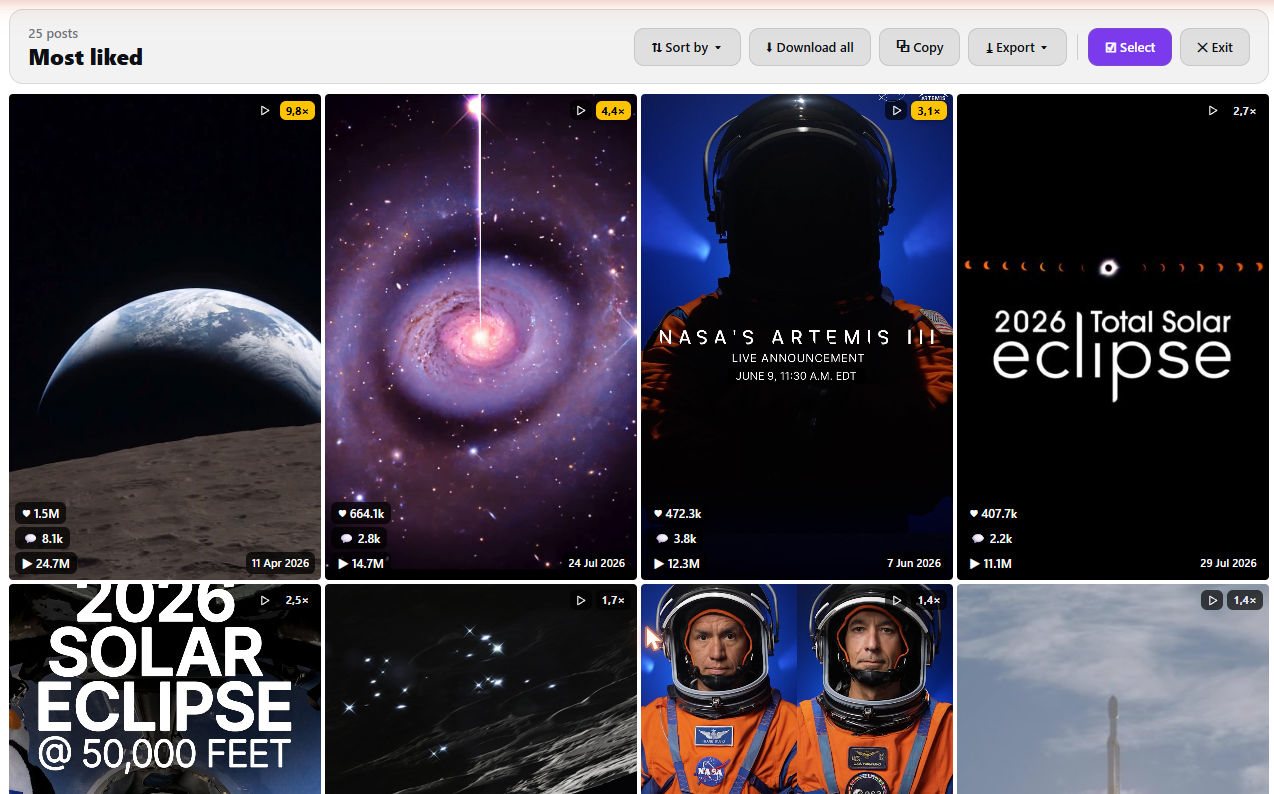
Every post comes back wearing its number: its figure divided by the median of that same batch. That's why a small creator with a ×20 stands out instantly, even when the raw figure looks tiny next to a huge account.
It appears from 10 posts up, and is flagged from ×3. On every network and on both plans.
Pricing
No sign-up to get going. Taxes are added on top of these prices.
Free
Sort and export
$0/month
Genuinely free, no card and no sign-up
Start for freePro
Best valueSort, download and get scripts
$15$20/month
billed at $180 a year · Save $60Cancel any time from your account
Plus your country's tax
Credits come back every month on the day you paid, and don't roll over. Sorting, YouTube scripts and exporting up to 25 posts never spend credits.
FAQ
What Viral Feed does, where it works, and what each plan includes. If something's missing, email us at support@viralfeed.cloud.
It's a research tool for short-form video. Open any creator in your niche and the same grid comes back with the breakouts first. From there you get media download, each video's script, and a spreadsheet with the lot that you can build a content plan from.
Scrolling shows you what someone posted. Viral Feed shows you what actually worked, with the numbers on every card. Then it does the part scrolling can't: it pulls the videos, the scripts and the metrics out into a spreadsheet.
It's the «×N» badge that appears on every post when you sort. It divides each post's value by the median of the batch you just sorted, which is how it tells a real breakout from something that only looks big because the account is: a ×10 means ten times that account's usual numbers, so a small creator with a ×20 post is a stronger signal than a million views that were a normal day for someone else. It needs at least ten posts to work, it shows up on every network, and it's there on the free plan too. It isn't a separate way to sort: you sort by views, likes or comments, and the badge is measured against whichever metric you picked.
For sorting: Instagram, on a profile and its Reels. TikTok, on a profile, Videos tab. X, on the Posts tab and Media → Videos. Threads, on a profile. LinkedIn, on a person's recent activity. YouTube, on a channel's Videos and Shorts. Pinterest doesn't sort, but it downloads and gets the script of the pin in front of you. And on Instagram and TikTok, without sorting anything, every thumbnail on a profile or on Explore carries the post's figures and its three buttons.
No, and no. Viral Feed only reads what the page you're already signed into has loaded, and reorders it inside your browser. It never posts, likes, follows or saves anything to your account, so there's no way for the creator to know. Refresh the page and it's back the way it was.
Very little. Getting a script outside YouTube sends the video's audio — the audio only, not the video — and the text comes back. Downloading sends a note saying «this many files of this type are about to be saved», so the credits can be counted: the file itself goes from the network to your disk without passing through any server of ours. Exporting more than 25 posts sends how many there are, also so the credit can be counted. All of that only when you click it. The one thing that happens on its own: if you have a key set, once a day the extension asks our server whether it's still valid, and that question carries only the key. Sorting, YouTube scripts and exporting up to 25 posts never leave your browser.
Yes. An export carries each post's link, its type, the date, likes, views, comments, shares where the network reports them, the outlier score, the caption, and the script once you've run it. As CSV, JSON, Excel, or copied ready to paste into Google Sheets. Columns a network doesn't publish drop out instead of showing up as zeros.
Yes, and both are Pro. Media download costs 1 credit per file and comes watermark free. Getting a script outside YouTube is charged by minutes of audio, with decimals: half a minute is half a credit. On YouTube scripts are free and unlimited, on the free plan too.
The free plan is a working tool, not a trial: the latest 25 posts or the last week, with every sort, the outlier score and every export. Pro removes the cap: the latest 50, 100, 200, 1,000, your own number, or everything that account has ever posted, over any date range.
If you signed in to the extension with the email you bought with, there's nothing to do: Pro arrives by itself. If not, open Viral Feed from the browser toolbar, go to Settings and press «Sign in» with that email. The key you get when you pay works too: in Settings, «Have a key?», paste it into «Your key» and press «Check the key». Either way, this month's remaining credits appear underneath.
The same key works. Paste it into Settings there too. The 500 monthly credits belong to your plan, so both machines share the same pot.
Yes, from viralfeed.cloud/cuenta, under «Invoices, card and cancel». Pro stays on until the end of the period you've already paid for, then you drop back to the free plan. Anything you exported or downloaded is yours to keep.
Yes, with the Pro plan. Switch on “Claude and ChatGPT” in Viral Feed's Settings, add the connector in the app and ask in your own words: “sort @nasa's last 100 reels by views”. Viral Feed sorts it in your Chrome and hands the posts to the chat. Up to 25 posts is free; above that, 1 credit per sort. The steps are at viralfeed.cloud/mcp.
No. Viral Feed installs from the Chrome Web Store and runs in Chrome and the other Chromium-based browsers, like Edge, Brave or Comet. It's a desktop extension, so there's no Safari version and no mobile app. It needs Chrome 116 or newer.
Email us. If something breaks, Settings → Help has a «Copy diagnostics» button that sums up your version, your plan and the last few errors without including your accounts, your posts or your key: paste that into the message and you save us three questions.